Dev License: This installation of WHMCS is running under a Development License and is not authorized to be used for production use. Please report any cases of abuse to abuse@whmcs.com

How to create/add an email address via the client portal

How to create/add an email address via the client portal


  1. Navigate to the client area
  2. Login
  3. Click on services
  4. Click on the hosting package name, eg pink
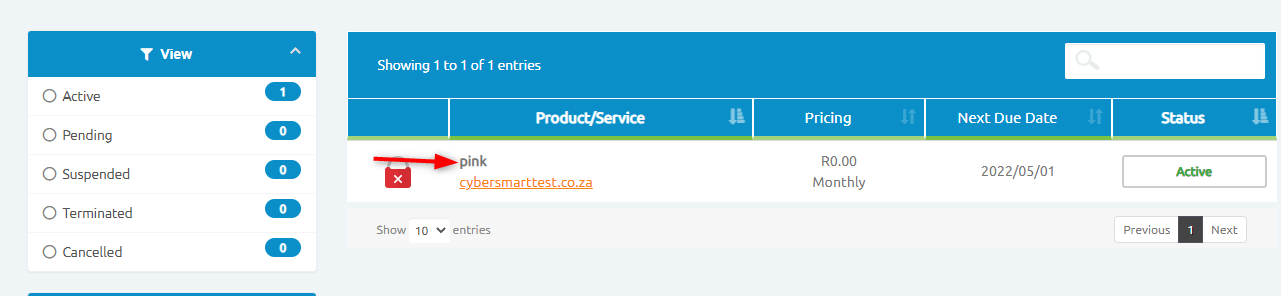
 

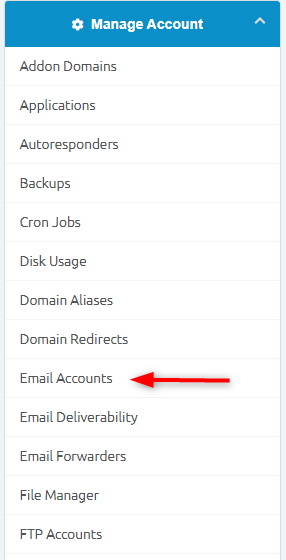
You will then be redirected to another page that contains all the cPanel features.

Click on Email Accounts.
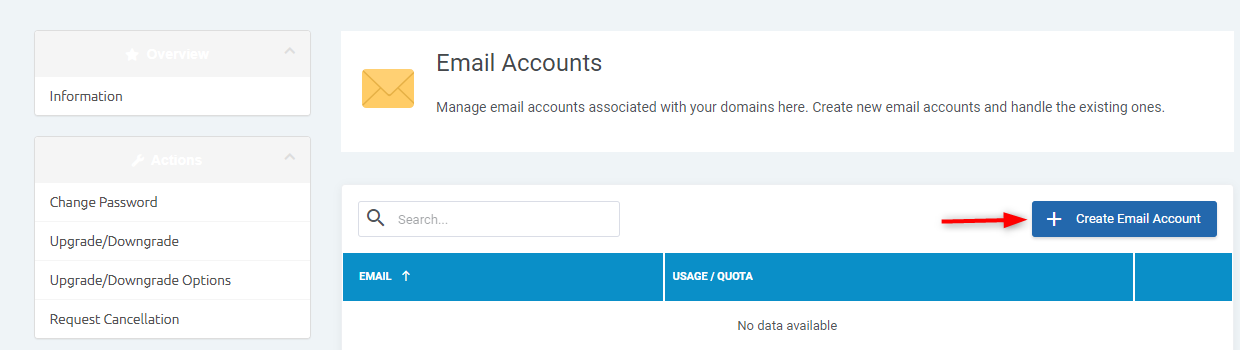
You will then be able to create, add or delete an email account.
  • add email, create email, email address
  • 4 Els usuaris han Trobat Això Útil
Ha estat útil la resposta?

Articles Relacionats

How to view your Account Statement

How to view your Account Statements   Login to the the Client Area...

How to Update Domain Contact Information

How to Update Domain Contact Information To update your domain contact information, you’d need...

How to upgrade / downgrade your hosting package

How to upgrade / downgrade your hosting package The steps below will assist with upgrading/...

Domain Renewal

Domain renewal A domain is valid for a year at a time and you will be notified when it is time...

How To Enable Registrar Lock

To enable the registrar lock for the domain names, please follow the steps below:   Login to...

Powered by WHMCompleteSolution