Dev License: This installation of WHMCS is running under a Development License and is not authorized to be used for production use. Please report any cases of abuse to abuse@whmcs.com

How do I upload my website to cPanel

How to upload a file using File Manager (cPanel)

This guide will take you through the steps to upload a file via the file manager

 Log in to cPanel.

Double click on the folder you wish to upload the file to. Note that Website files need to be uploaded to the public_html folder.
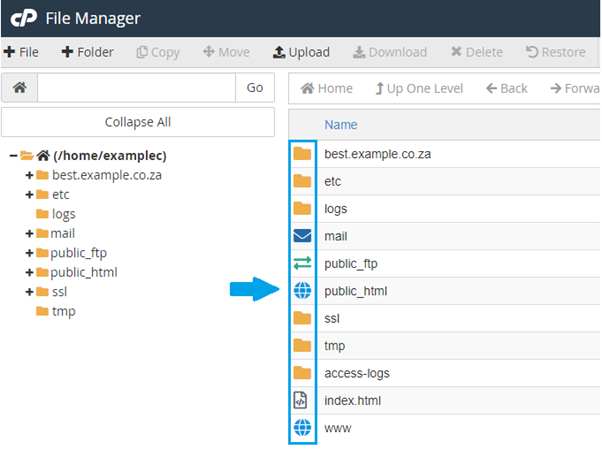
For multiple files, you can zip the folder and un-compress it in the File manager by selectin the file and then click on the Extract option above.

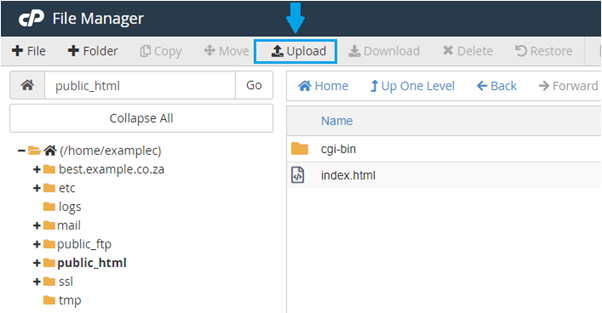
Click on “Upload”. 
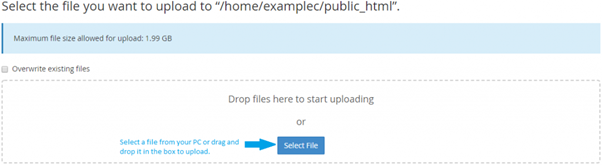
Click on “Select File” to browse your PC for the file you wish to upload. 
Click on “Go Back” once the file has uploaded. 
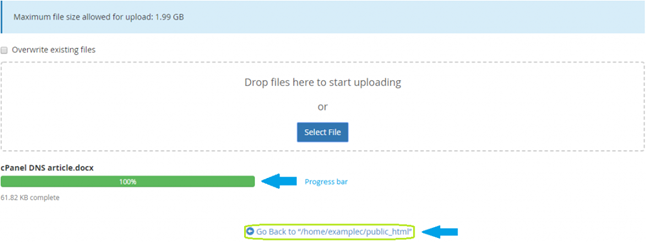
 You have successfully uploaded a file through the file manager. 

You can view the tutorial below:

  • upload, file manager, upload my website
  • 0 کاربر این را مفید یافتند
آیا این پاسخ به شما کمک کرد؟

مقالات مربوطه

How do I determine which hosting package is right for me

Your hosting option will be determined by the amount of disk-space, MySQL Databases and email...

How do I know if what type of hosting I require

This would depend on the format of your website. Windows hosting is used for .asp and .aspx...

How do I obtain an auth/EPP code for my domain name?

An Authorisation Code or EPP Key is an extra form of security that is used when transferring high...

How does disk space work on the hosting plan

All your email traffic will be included in your monthly bandwidth and disk space usage BUT all...

How I choose a domain name

Company Name Your business name is ideally the best domain for you to initially register, as it...

Powered by WHMCompleteSolution